リスト構造の導入
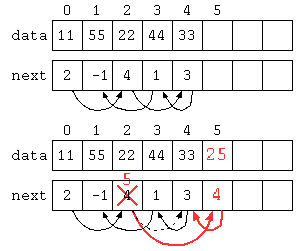
以下のデータ構造では、配列にデータと次のデータの場所を覚えることで、一見デタラメな順序に保存されているようにみえるが、next[] に次の値の保存されている場所が入っている。
import java.util.*;

public class Main {           //    0    1    2    3    4    5
    static int[] data = new int[] { 11 , 55 , 22 , 44 , 33 , 0 , 0 , 0 , 0 , 0 } ;
    static int[] next = new int[] { 2  , -1 , 4  , 1  , 3  , 0 , 0 , 0 , 0 , 0 } ;
    static int   size = 5 ;
    static int   top = 0 ;

    static void insert( int n , int x ) {
        data[ size ] = x ;
        next[ size ] = next[ n ] ;
        next[ n ] = size ;
        size++ ;
    }

    public static void main(String[] args) throws Exception {
        for( int idx = top ; idx >= 0 ; idx = next[ idx ] )
            System.out.println( data[ idx ] ) ;
        insert( 2 , 25 ) ;
        for( int idx = top ; idx >= 0 ; idx = next[ idx ] )
            System.out.println( data[ idx ] ) ;
    }
}
#include <stdio.h>

int  data[ 10 ] = { 11 , 55 , 22 , 44 , 33 , 0 , 0 , 0 , 0 , 0 } ;
int  next[ 10 ] = { 2  , -1 , 4  , 1  , 3  , 0 , 0 , 0 , 0 , 0 } ;
int  size = 5 ;
int  top  = 0 ;

void insert( int n , int x ) {
    data[ size ] = x ;
    next[ size ] = next[ n ] ;
    next[ n ] = size ;
    size++ ;
}

int main() {
    for( int idx = top ; idx >= 0 ; idx = next[ idx ] )
        printf( "%d\n" , data[ idx ] ) ;
    insert( 2 , 25 ) ;
    for( int idx = top ; idx >= 0 ; idx = next[ idx ] )
        printf( "%d\n" , data[ idx ] ) ;
    return 0 ;
}
このようなデータ構造であれば、データ自体は末尾に保存しているが、次の値が入っている場所を修正することで途中にデータを挿入することができる。この方法であれば、途中にデータを入れる場合でもデータを後ろにずらすような処理が不要であり、O(1)で途中にデータを挿入できる。
同じプログラムを、データと次のデータの配列番号のオブジェクトで記述してみた。
import java.util.*;

class DataNext {
    public int data ;
    public int next ;
    DataNext( int d , int n ) {
        this.data = d ;
        this.next = n ;
    }
}

public class Main {
    public static DataNext[] table = {
        new DataNext( 11 , 2 ) ,
        new DataNext( 55 , -1 ) ,
        new DataNext( 22 , 4 ) ,
        new DataNext( 44 , 1 ) ,
        new DataNext( 33 , 3 ) ,
        null ,
        null ,
        null ,
        null ,
        null ,
    } ;
    public static int size = 5 ;

    public static void insert( int n , int x ) {
        table[ size ] = new DataNext( x , table[ n ].next ) ;
        table[ n ].next = size ;
        size++ ;
    }
    public static void main(String[] args) throws Exception {
        for( int idx = 0 ; idx >= 0 ; idx = table[ idx ].next )
            System.out.println( table[ idx ].data ) ;

        insert( 2 , 25 ) ;

        for( int idx = 0 ; idx >= 0 ; idx = table[ idx ].next )
            System.out.println( table[ idx ].data ) ;
    }
}
- オブジェクトで途中に挿入(Paiza.io)
このプログラムでは、配列の当初の長さを超えてデータを格納することはできない。
リスト構造 ListNode
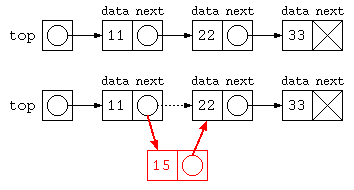
前述の data と next で次々とデータを続けて保存するために、リスト構造(連結リスト)を定義する。
import java.util.*;

class ListNode {
    int      data ;
    ListNode next ;
    ListNode( int d , ListNode nx ) {
        this.data = d ;
        this.next = nx ;
    }
} ;

public class Main {
    public static void main(String[] args) throws Exception {
        ListNode top = new ListNode( 11 , new ListNode( 22 , new ListNode( 33 , null ) ) ) ;

        for( ListNode p = top ; p != null ; p = p.next )
            System.out.println( p.data ) ;

        top.next = new ListNode( 15 , top.next ) ;

        for( ListNode p = top ; p != null ; p = p.next )
            System.out.println( p.data ) ;
    }
}
#include <stdio.h>
#include <stdlib.h>

struct ListNode {
    int       data ;
    ListNode* next ;
} ;

ListNode* newListNode( int d , ListNode* nx ) {
    ListNode* _this = new ListNode() ;
    if ( _this != NULL ) {
        _this->data = d ;
        _this->next = nx ;
    }
    return _this ;
}

int main() {
    ListNode* top = newListNode( 11 , newListNode( 22 , newListNode( 33 , NULL ) ) ) ;
    for( ListNode* p = top ; p != NULL ; p = p->next )
        printf( "%d\n" , p->data ) ;
    top->next = newListNode( 15 , top->next ) ;
    for( ListNode* p = top ; p != NULL ; p = p->next )
        printf( "%d\n" , p->data ) ;
    return 0 ;
}
クラスの宣言とコンストラクタ・メソッド
import java.util.*;

// クラス宣言
class Person {
    // データ構造
    String name ;
    int    age ;

    // コンストラクタ(データ構造を初期化する関数)
    Person( String n , int x ) {
        this.name = n ;    // this は対象となるデータそのものを指す
        this.age  = x ;    // 対象が明言されていれば、this は省略可能
    }
    // データを扱うメソッド
    void print() {                 // データを表示
        System.out.println( this.name + "," + this.age ) ;
    }
    boolean sameAge( Person x ) {  // 同じ年齢か判断するメソッド
        return this.age == x.age ;
    }
} ;

public class Main {
    public static void main(String[] args) throws Exception {

        Person tsaitoh = new Person( "Tohru Saitoh" ,  59 ) ;
        Person tomoko  = new Person( "Tomoko Saitoh" , 48 ) ;

        tsaitoh.print() ;  // Tohru Saitoh, 59
        tomoko.print() ;   // Tomoko Saitoh,48

        if ( tsaitoh.sameAge( tomoko ) ) {
            // sameAge( Person x ) では、
            // this = tsaitoh , x = tomoko となって呼び出される
            System.out.println( "同じ年齢ですよ" ) ;
        }
        Person[] family = new Person[ 2 ] ;
        family[0] = tsaitoh ;
        family[1] = tomoko ;
        for( int i = 0 ; i < 2 ; i++ )
            family[ i ].print() ;
    }
}こ
このプログラムのデータ構造は下記のような状態。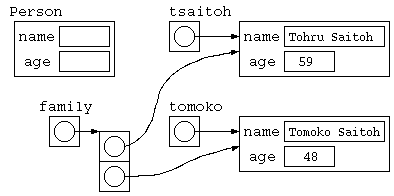
リスト操作
リスト構造に慣れるために簡単な練習をしてみよう。リスト構造のデータに対するメソッドをいくつか作ってみよう。print() や sum() を参考に、データ数を求める count() , 最大値を求める max() , データを検索する find() を完成させてみよう。
class ListNode {
    (略)
} ;

public class Main {
    static void print( ListNode p ) {   // リストを表示
        for( ; p != null ; p = p.next )
            System.out.print( p.data + " " ) ;
        System.out.println() ;
    }

    static int sum( ListNode p ) {      // リストの合計を求める
        int s = 0 ;
        for( ; p != null ; p = p.next )
            s += p.data ;
        return s ;
    }

    static int count( ListNode p ) {    // データ件数を数える

    }

    static int max( ListNode p ) {      // データの最大値を求める

    }

    static boolean find( ListNode p , int key ) { // データ列の中から特定のデータを探す
                                                  //   見つかったら true , 見つからなければ false
    }
    public static void main(String[] args) throws Exception {
        ListNode top = new ListNode( 11 , new ListNode( 22 , new ListNode( 33 , null ) ) ) ;
        print( top ) ;
        System.out.println( "合計:" + sum( top ) ) ;
        System.out.println( "件数:" + count( top ) ) ;
        System.out.println( "最大:" + max( top ) ) ;
        System.out.println( "検索:" + (find( top , 22 )
                                       ? "みつかった" : "みつからない" ) ) ;
    }
}